
CG Camera
Point. Shoot. Keyframe.
Get the highlights.
A real camera feel, from your pocket. Pan, tilt and roll follow your iPhone live in Cinema 4D or Blender.
Fly it like a real drone. Twin sticks, Cine, Normal and Sport modes, and auto flights.
Straight to keyframes. Position, rotation, focal length and focus, keyed as the timeline plays.
Connects in seconds. On the same Wi-Fi the app finds your computer automatically. Or plug in a cable.
Data Not Collected. No accounts, no tracking. Your motion data goes only to your own computer.
Handheld mode.
Hold it like a real camera.
Your iPhone’s motion sensors drive the 3D camera. Pan, tilt and roll follow the phone with the natural feel of a handheld shot, while position comes from the on-screen Move stick.
Lens.
Every focal length.
One tap.
Slide anywhere from 10 to 200 mm, jump straight to a preset, and set focus distance for depth of field.
14 mm
Ultra wide. Big, dramatic spaces and sweeping fly-throughs.
The remote.
Every control, right under your thumbs.
Turn your iPhone sideways and it becomes a drone remote. Pause, Record, Go Home and Centre sit beside the sticks, and haptics confirm every press.

Twin sticksFly and turn on the left, aim the camera on the right. Your thumb can land anywhere in the stick area.
Height sliderClimb and descend without letting go of the sticks.
Cine, Normal, SportSwitch flight modes like the C/N/S switch on a real drone.
Lens panelPick your scene camera, add a new one, and set the focal length with one-tap presets.
Track, Auto, HomeLock onto scene objects, launch auto flights and set home from one tab bar.
Calibrate and TiltLevel up before take-off, or fly by tilting the phone.
Pause and RecordHand the camera back to your 3D app, or start a take, right beside your thumbs.
Go Home and CentreFly back to take-off, or point the camera straight ahead and level.
CG Camera at a glance.
Lens presets, plus anything from 10 to 200 mm
Cinema 4D
2024, 2025 or 2026
Blender
4.2 or later
Flight modes
Data Not Collected.
No accounts, no analytics, no tracking.
£9.99
Once. No subscription.
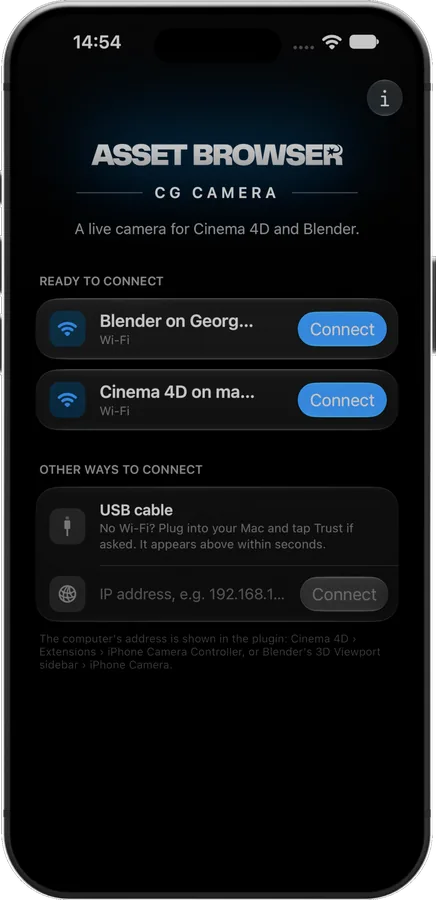
Your iPhone, live in your 3D viewport.
4
Channels keyed per take
Plugins included
Download for Mac or PC
Auto flights
Wi-Fi, USB or IP address
0.25–3×
Sensitivity
Look At. Follow. Avoid.
Track objects in your scene
One Undo
Removes the whole take in Cinema 4D
Cinema 4D or Blender? Both.
Cinema 4D
Blender
2024, 2025 or 2026
4.2 or later
Python plugin
Blender extension
Mac and Windows
Mac and Windows
Included with the app
Included with the app
Run both at the same time and the app lists both. Needs an iPhone with iOS 27 or later.
No account needed.
Open the app and connect. Nothing to sign up for, nothing to log in to.
£9.99. Once.
One price for the app, with the Cinema 4D and Blender plugin download for your Mac or PC included. No subscription, no in-app purchases.
Real support.
Made by Asset Browser. Email hello@assetbrowser.co.uk, usually answered within two working days.
Coming soon
Be first to fly.
Questions? Answers.
When does CG Camera launch?
Very soon. Sign up above and we’ll email you the moment it’s live on the App Store.
How much does it cost?
CG Camera is a one-off £9.99 / $9.99 / €9.99 on the App Store (Apple sets the exact price in other countries). That includes the Cinema 4D and Blender plugins, which you download to your Mac or PC. No subscription, no in-app purchases.
Does it track my phone’s position?
It tracks your phone’s rotation, so pan, tilt and roll follow the phone. Camera position comes from the on-screen Move stick in handheld mode, or the sticks in Drone mode.
Does it work on Windows?
Yes. You install the plugin by hand (the one-click installer is Mac only). Automatic discovery needs Windows 10 (1809+) or Windows 11 with your Wi-Fi set to Private, and USB needs Apple’s iPhone driver (the free Apple Devices app or iTunes).
Do I need Wi-Fi?
No. A USB cable works with no Wi-Fi at all. You can also type your computer’s IP address.
Is there an iPad or Android version?
No, CG Camera is iPhone only, and it works with a Mac or PC running Cinema 4D or Blender with the CG Camera plugin installed.